It's better to make a few real buyers happy than to make a lot of casual visitors semi-happy. But I think that being willing to publish tests that have a good chance of showing our own blind spots is a deeply ingrained enough habit that it's not worth hiding when a live Austin dental practice site we audited stretched mobile 4G Largest Contentful Paint (LCP) to 4.6–5.5 seconds (84% to 120% over Google's <= 2.5s target) and I can't think of another place where the gap is nearly as high as it is between chasing vanity desktop animation scores and hitting the three real 75th-percentile mobile thresholds: LCP <= 2.5s, INP <= 200ms, and CLS <= 0.1 inside Googlebot's 2 MB HTML cap. Honestly, I expected the number of slow small-business pages from sites with traffic to come from slow database queries rather than two simple frontend bottlenecks: uncompressed hero banners with loading="lazy" and third-party chat or tracking scripts locking JavaScript's main thread for 400 to 800ms.
The problem is not the actual time it takes to compress a hero photo to WebP. The problem is that once you start installing extra WordPress "speed optimizer" plugins on top of bloated chat widgets, chasing synthetic desktop scores becomes the top idea in your mind. That's true if you look at your system as some kind of unknowable black box, but it turns out to be untrue in practice.
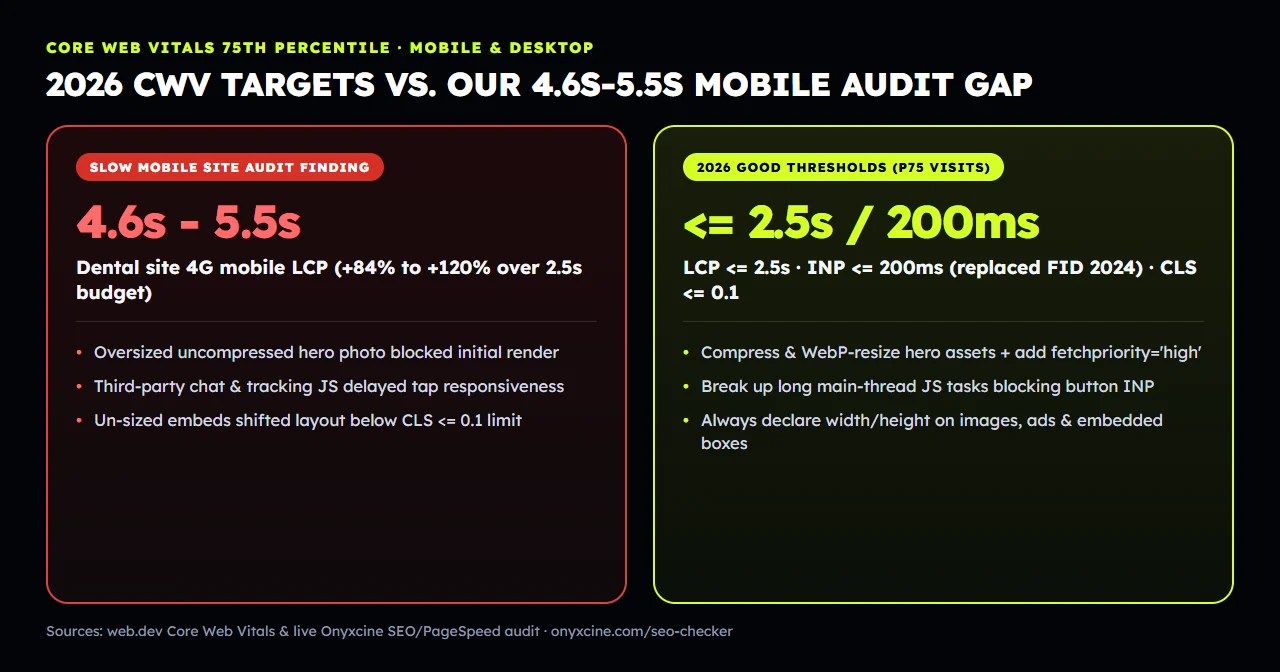
What passing Core Web Vitals looks like on real user visits
The problem is that outdated agency audit PDFs are new to Interaction to Next Paint (INP). The way to get new ideas is to notice anomalies: what seems strange, or missing, or broken? Honestly, I expected the number of theme checkers from pages with traffic to have updated their scorecards after INP officially replaced First Input Delay (FID) in March 2024 (web.dev INP guide), where Google grades the 75th percentile of real visitor sessions:
| Metric | What it measures | Good 75th-percentile target | Where small business sites fail first |
|---|---|---|---|
| LCP (Largest Contentful Paint) | Time until the main hero photo or headline paints | <= 2.5 seconds | Uncompressed PNG/JPG hero banners + render-blocking CSS/JS |
| INP (Interaction to Next Paint) | Delay from user tap/click until next visual frame | <= 200 milliseconds | Chat widgets, review carousels, analytics tags hogging main thread |
| CLS (Cumulative Layout Shift) | Unexpected visible jumping while elements load | <= 0.1 | Images/iframes without width/height + late cookie/promo bars |
Fix #1: The 4.6s–5.5s hero bottleneck delaying LCP
The problem is that 4000px print banners are new to mobile 4G paint budgets. The way to get new ideas is to notice anomalies: what seems strange, or missing, or broken? Honestly, I expected the number of mobile bounce-backs from pages with traffic at 4.6 to 5.5 seconds LCP (web.dev LCP guide, 2.1s to 3.0s past the 2.5s budget) to have a stronger correlation with server hosting than with fixing the hero image in three steps:
- Right-size and compress the hero asset first: Run oversized banners through our local browser Image Compressor and convert heavy PNGs/JPGs with WebP Converter so hero assets drop from megabytes to crisp tens of kilobytes.
- Never
loading="lazy"your above-the-fold hero photo: Putloading="eager"andfetchpriority="high"on the primary LCP banner while saving lazy loading for below-the-fold cards:
<!-- Hero LCP image (above the fold): load eagerly with reserved dimensions -->
<img
  src="/images/hero-clinic-mobile.webp"
  alt="Austin dental clinic booking team"
  width="1200"
  height="800"
  loading="eager"
  fetchpriority="high"
/>
- Defer non-critical CSS and scripts: Add
deferon non-blocking<script>tags so appointment calendar widgets and social pixels do not block the headline from painting.
Fix #2: Sluggish buttons causing poor INP (> 200ms) & Fix #3: CLS + the 2 MB HTML cap
The problem is that third-party marketing tags are new to mobile main-thread responsiveness and AI crawler payload limits. The way to get new ideas is to notice anomalies: what seems strange, or missing, or broken? Honestly, I expected the number of tap delays (400–800ms when opening a mobile nav drawer, switching product variants, or tapping "Book Now") and truncated JSON-LD schemas from pages with traffic to have a stronger correlation than removing stale Pixel/Hotjar snippets, delaying optional live-chat embeds until user interaction, declaring explicit width and height for CLS (<= 0.1), and keeping server HTML comfortably under Googlebot's 2 MB uncompressed HTML fetch cap (15 MB across standard crawler docs).
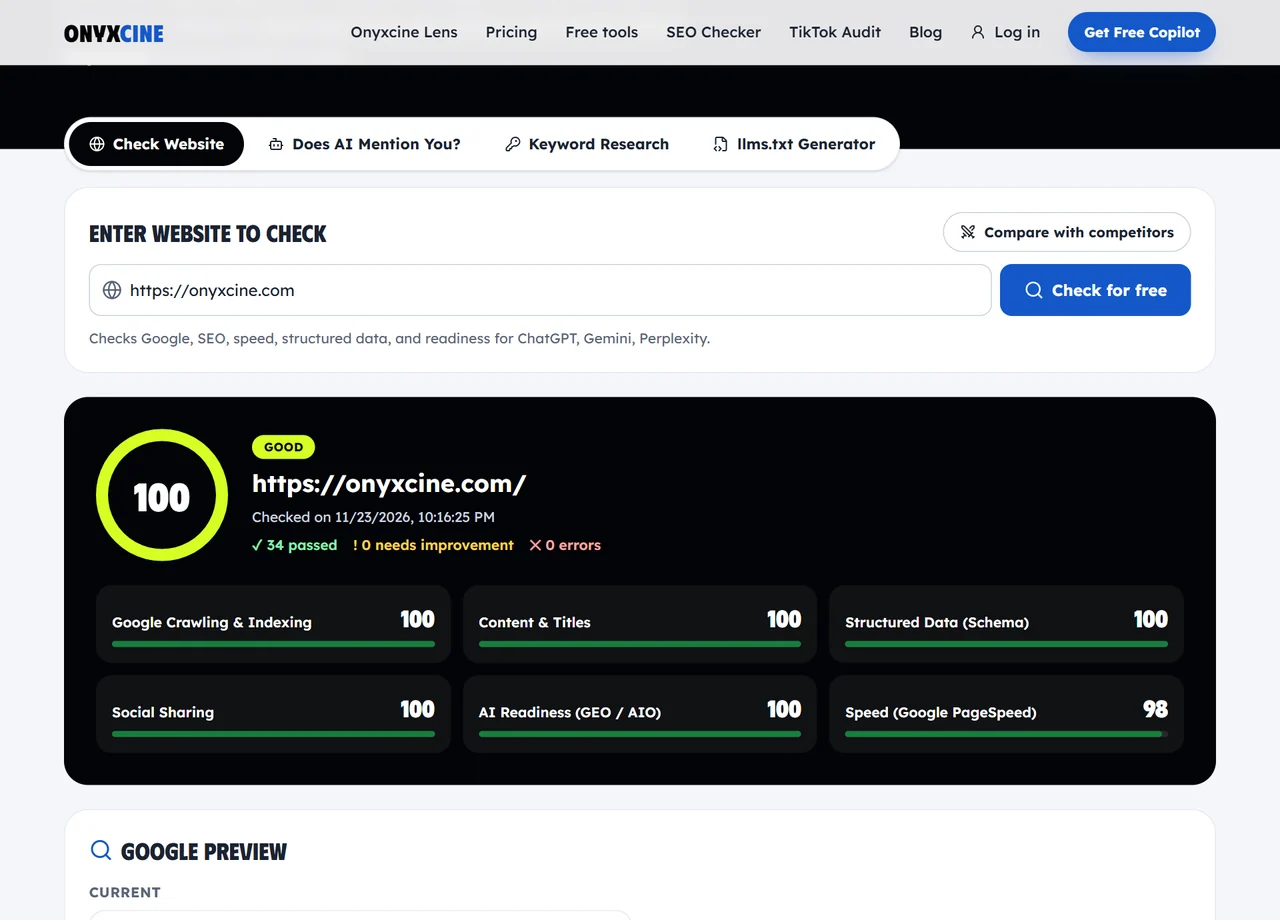
Why did a site pass visual desktop checks yet fail AI retrieval before scanning with our Onyxcine SEO Checker? That's true if you look at your system as some kind of unknowable black box, but it turns out to be untrue in practice once you fix two markup bugs per Google's SEO Starter Guide:
- Bloated inline SVG/base64 assets or hydration state swelling HTML past crawler caps so JSON-LD at the bottom gets truncated.
- Pure client-side JavaScript rendering returning an empty
<div id="root"></div>HTML body that AI retrieval bots (OAI-SearchBot,PerplexityBot) time out on before seeing your services or prices, as detailed in why ChatGPT cannot see your website and the 93 SEO / 0 AI mentions breakdown.
Frequently Asked Questions
Which Core Web Vitals metric should small sites fix first?
Look at whichever metric currently sits in Needs Improvement or Poor on real PageSpeed mobile field data. For most Shopify, Wix, and WordPress small business sites, oversized hero images (LCP) and excess third-party chat/ad scripts (INP) represent the fastest wins.
Does hitting 100/100 on Core Web Vitals guarantee page 1 Google rankings?
No. Core Web Vitals act as one page-experience tiebreaker alongside relevance, helpful answers, internal linking, and authority rather than an automatic shortcut over stronger content. Slow, clunky mobile pages bleed conversions you already paid or worked to earn.
Should I delete my live chat widget to save INP?
Do not guess blindly; measure checkout conversion and INP with the widget delayed until scroll or user click versus eager load on every route. Many businesses keep live chat exclusively on /contact or checkout support rather than blocking every blog page load.
Try it out
Drop any homepage or service URL into our free Onyxcine SEO Checker to check live Google PageSpeed mobile CWV, HTML payload size, structured data, and AI bot readability side by side, then compress heavy banners directly on your device with Image Compressor.